
Screen Watch System
Complete documentation of the screen-watch pipeline: session lifecycle, transport selection, frame processing, and how the agent sees and reasons about what's on screen.
Canonical media hub: ../capabilities/media.md
See also: ../operations/public-https.md (public URL gating).
Native Discord receive status: discord-streaming.md
Direct selfbot stream-watch plan: ../archive/selfbot-stream-watch.md
Cross-cutting settings contract: ../reference/settings.md
This document is about inbound screen/video watch. For the broader product-level media story, including music/video playback and outbound publish context, start at ../capabilities/media.md. The same selfbot stream-discovery control plane also supports outbound native self publish for music video relay and browser-session share; that sender path is documented in discord-streaming.md.
Persistence, preset inheritance, dashboard envelope shape, and save/version semantics live in ../reference/settings.md. This document covers the screen-watch pipeline and the voice.streamWatch settings that shape voice-local visual context.
Design Philosophy
Screen sharing gives the agent eyes. The architecture follows the same autonomy principle as the rest of the system: give the agent rich context and let it decide what to do.
A person sitting next to someone sharing their screen would:
- See the screen continuously
- Remember recent screen state over time
- Decide when to comment and when to stay quiet
- Answer direct questions about the screen using both the current view and what happened a moment ago
Screen watch now follows that same shape with one pipeline:
- Every admitted frame refreshes the latest-frame buffer
- A separate note loop keeps rolling screen notes fresh
- Proactive commentary uses those notes plus the latest frame
- Normal voice turns use the notes without paying image cost unless the turn is explicitly about the screen
There is no longer a direct-vs-scanner mode switch. The only runtime behavior is the note loop plus commentary loop.
Architecture Overview
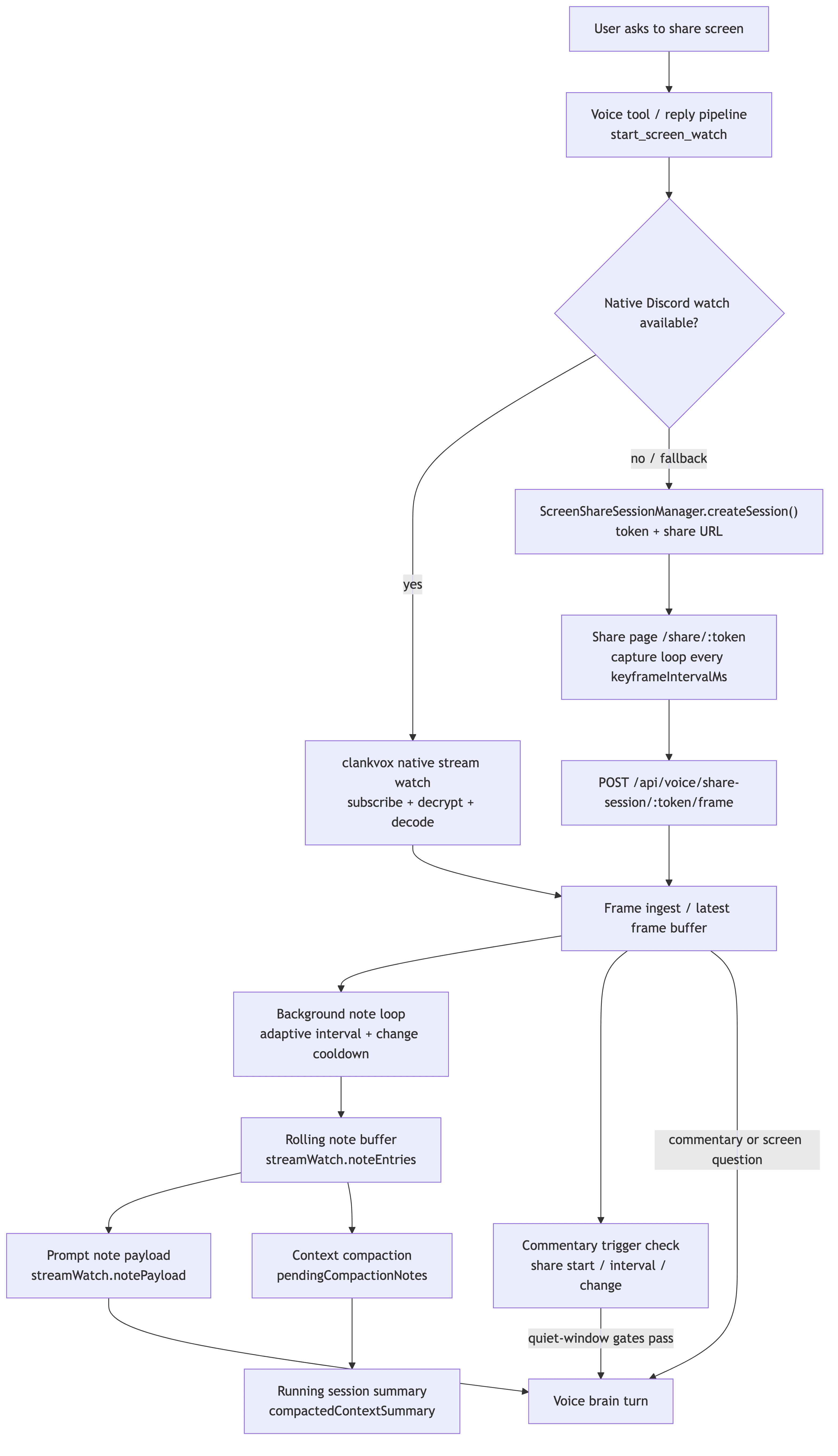
Discord VC user says "share my screen" / turns on webcam
         │
         ▼
  Selfbot reply pipeline / voice tool
  (start_screen_watch)
         │
         ▼
  Runtime chooses watch transport
  ├─ Native Go Live screen watch (preferred for screen shares)
  │  ├─ selfbot gateway resolves target + stream credentials
  │  ├─ clankvox opens native stream-watch transport (separate RTC connection)
  │  ├─ clankvox decrypts and depacketizes H264/VP8 video frames
  │  ├─ H264: persistent OpenH264 decoder in clankvox decodes to YUV, turbojpeg encodes to JPEG, sent as DecodedVideoFrame IPC
  │  ├─ VP8: raw bitstream forwarded to Bun for per-frame ffmpeg decode to JPEG
  │  └─ feed frames to the same processing pipeline
  ├─ Webcam video watch (fallback when no Go Live stream)
  │  ├─ target user has webcam on but is not Go Live streaming
  │  ├─ webcam video arrives on the main voice connection (no separate transport)
  │  ├─ clankvox subscribes via OP15 media sink wants on the voice connection
  │  └─ feed frames to the same processing pipeline
  └─ Share-link fallback
     ├─ ScreenShareSessionManager.createSession()
     ├─ bot sends /share/:token link
     ├─ browser getDisplayMedia() capture loop
     └─ POST /api/voice/share-session/:token/frame
Frame Processing Pipeline
┌─────────────────────────────────────────────────────┐
│                  FRAME INGESTION                     │
│  clankvox / share page → ingestStreamFrame          │
│  (rate-limited by maxFramesPerMinute)               │
└──────────────┬──────────────────────────┬────────────┘
               │                          │
               ▼                          ▼
┌──────────────────────────┐   ┌──────────────────────┐
│        NOTE LOOP         │   │   LATEST FRAME STORE │
│                          │   │   (always updated)   │
│  scene cut               │   └──────────┬───────────┘
│    → run now             │              │
│  change >= threshold     │              │
│    → run now             │              │
│  change < static floor   │              │
│    → idle interval       │              │
│  otherwise               │              │
│    → normal interval     │              │
│                          │              │
│  Produces: short notes   │              │
│  Never speaks            │              │
└──────────┬───────────────┘              │
           │                              │
           ▼                              │
┌──────────────────────────────────────────▼──────────┐
│                    VOICE BRAIN                       │
│                                                      │
│  Normal turns: rolling notes only                    │
│    + see_screenshare_snapshot tool (on-demand frame) │
│  Commentary turns: rolling notes + current frame     │
│  Screen questions: rolling notes + current frame     │
│                                                      │
│  Persistent context: "Screen watch active —          │
│    viewing {streamerName}'s screen."                 │
│                                                      │
│  Output: spoken reply / [SKIP] / [[NOTE:...]]        │
└─────────────────────────────────────────────────────┘
Note loop
The note loop is a standalone background loop that runs while screen watch is active.
It is driven by the latest observed visual-change metrics:
scene cutruns immediately, subject to the change cooldownchangeThresholdruns immediately on meaningful visual changestaticFloorswitches to the idle interval when the screen is effectively staticnoteIntervalSecondsis the normal cadence for active screensnoteIdleIntervalSecondsis the slower cadence for static or ambient-motion screens
The note loop is intentionally not gated by voice-turn mechanics:
- No audio quiet window
- No pending voice-work gate
- No playback gate
It is throttled only by natural backpressure and its own cooldowns:
- Each vision call is awaited before another note run starts
changeMinIntervalSecondsprevents rapid-fire note runs on sustained motionmaxFramesPerMinutestill limits frame admission at ingest time
Every successful note run appends one note (~40 words max, 256 output tokens) into the rolling note buffer. Notes are private model context, not spoken output. The note prompt biases toward: readable on-screen text, salient entities, change from the previous frame, and explicit uncertainty when the frame is ambiguous.
Commentary turns
The commentary loop is the proactive speech path. It uses the same visual-change metrics as the note loop, but commentary is still gated like optional voice speech:
- first frame (
share_start) - interval (
commentaryIntervalSeconds) - meaningful visual change
- audio quiet window
- no pending voice work
- no active playback
autonomousCommentaryEnabled
When interval and visual-change triggers are both true on the same frame, runtime labels the request as change_detected so logs and downstream prompt context reflect the on-screen event that caused the turn.
If a trigger fires while the voice pipeline is busy (ongoing playback, pending response, queued voice work, or the inbound-audio quiet window), runtime defers that trigger and delivers it on the next eligible frame instead of dropping it.
When commentary fires, the voice brain sees:
- rolling notes from the note loop
- the latest raw frame as an image attachment
- full voice conversation context
The model still decides whether to speak or [SKIP]. Commentary can also emit [[NOTE:...]] directives, which are stored in the same rolling note buffer as note-loop observations.
Normal voice turns
Normal user-driven voice turns do not carry a frame by default. They see the rolling notes, persistent streamer identity ("Screen watch active — viewing alice's screen"), and the rest of the conversation context.
If the turn is directly about the screen (heuristic match via isScreenWatchQuestion), the current frame is re-attached for that reply. This keeps screen answers grounded without paying image cost on every unrelated turn.
For cases where the heuristic doesn't match but the agent still needs visual context, the see_screenshare_snapshot tool is available. This tool returns the latest buffered frame as an image input, letting the agent inspect the screen on demand. It uses voiceContinuationPolicy: "always", meaning the model calls the tool and then gets a second LLM call to speak about what it saw (one extra round trip, ~500ms-3s). The tool is only registered when screen watch is active and a recent frame exists.
This follows the standard design pattern: thin heuristic for the fast/cheap common case, agentic tool fallback for everything else.
Note Lifecycle And Compaction
Screen notes are not just a short-term cache. They feed the session's running memory:
- New note-loop output and
[[NOTE:...]]directives are appended tostreamWatch.noteEntries. - The rolling buffer is capped by
maxNoteEntries. - When older notes roll off, they are moved into
pendingCompactionNotes. - Voice context compaction folds those pending notes into
compactedContextSummaryalongside transcript turns. - Future prompts see both the recent rolling notes and the longer-running compacted session summary.
This preserves temporal continuity. The agent keeps fresh detail from recent notes while the compacted summary retains the broader arc of the shared activity.
Session Lifecycle
Creation
- Triggered by explicit user request, model intent, or the
start_screen_watchvoice tool start_screen_watchcan optionally include{ target: "display name or user id" }- Realtime instructions can already list active Discord sharers before a watch starts
- Runtime tries native Discord watch first through the selfbot's active voice session
- Native watch binds an explicit target first when one is provided and resolves cleanly
- An explicit target can use discovered Go Live state immediately, even before native video-state frames have populated the active-sharer roster
- Explicit targets never silently retarget to a different sharer; if the requested person is not sharing, native watch fails cleanly and link fallback can still target that same person
- Without an explicit target, native watch auto-binds only when runtime can identify a safe target:
- requester has discovered Go Live state, even before credentials or frame-backed sharer state
- requester is actively sharing
- exactly one user is actively sharing
- a single discovered Go Live target exists while the active-sharer roster is still empty
- If an explicit target resolves to someone in voice who is not actively sharing, link fallback can still target that user when
STREAM_LINK_FALLBACK=true - If native watch is unavailable, the runtime falls back to
ScreenShareSessionManager.createSession() - Fallback sessions reuse existing requester+target links when possible
- Set
STREAM_LINK_FALLBACK=falseto disable that fallback transport entirely and stay native-only
Native Discord watch (Go Live + webcam)
Two transport modes exist for native Discord video.
Go Live screen share uses the selfbot gateway's stream discovery and a dedicated stream_watch transport:
- The selfbot tracks active sharers and stream credentials
clankvoxopens a separate native stream-watch transport for the target user's active stream- For H264,
clankvoxkeeps a persistent OpenH264 decoder that accumulates reference-frame state across all frames - Decoded YUV is encoded to JPEG via turbojpeg and emitted as
DecodedVideoFrameIPC messages - JPEG emission is rate-limited to
nativeDiscordMaxFramesPerSecond, but the decoder still sees every frame for state accumulation - For VP8,
clankvoxforwards raw payloads and Bun decodes sampled keyframes to JPEG via per-frame ffmpeg - Decoded JPEGs flow into the screen-watch note/commentary pipeline
- Repeating
start_screen_watchfor the same native target reuses the active watch instead of reconnecting and preserves buffered frame context - Successful native watch start can still be
waiting_for_frame_context; runtime only reportsframeReady=trueonce a decoded or buffered image frame exists for the current watch session - If multiple unrelated Discord sharers are active, the agent can pick one with
start_screen_watch({ target: "name" }) - If multiple unrelated Discord sharers are active and no explicit target is provided, runtime does not guess a native target
- Active native sharer metadata is prompt context, but image visibility still requires an active watch session
- Voice session tracks discovered Go Live users in
goLiveStreams, plus a derived primarygoLiveStreamfor legacy consumers and current-target hints - Link fallback is suppressed at two checkpoints when native watch is already active for the target
Webcam video is the fallback when the target user has webcam video but is not Go Live streaming:
enableWatchStreamForUsercheckssharerHasWebcamOnly()when Go Live discovery fails- If webcam is present, runtime subscribes to the user's video on the main voice connection with
preferredStreamType: null - Webcam video SSRC appears on the main voice UDP socket alongside audio
clankvoxsends OP15 media sink wants for the webcam SSRC on the voice connection- The same H264 decode path handles webcam frames
- Frames flow through the same
DecodedVideoFrameIPC and note/commentary pipeline - Media sink wants are partitioned: screen SSRCs route to
stream_watch, webcam SSRCs route to the main voice connection
Share page fallback
- Route:
GET /share/:token - Browser-rendered HTML with embedded JS (no framework)
getDisplayMedia()for screen/window/tab capture- Capture loop: canvas -> JPEG -> POST to frame endpoint
- Countdown timer showing remaining session time
- Adaptive bitrate: downscale on
frame_too_large, upscale after repeated success
Frame ingest
- Route:
POST /api/voice/share-session/:token/frame - Validates token, session TTL, and voice presence on every frame
- Auto-stops session if requester or target leaves VC
- Request body:
{ mimeType: "image/jpeg", dataBase64: "...", source: "share_page" } - Response:
{ accepted: true/false, reason: "ok" | "frame_too_large" | ... }
Expiration
- Default TTL: 12 minutes (configurable 2-30 via
publicShareSessionTtlMinutes) - Max active sessions: 240
Settings Reference
All settings live under voice.streamWatch.
Legacy mode-specific keys such as brainContextMode, brainContextEnabled, directMinIntervalSeconds, and related direct/context-brain fields are migration-only. Runtime behavior now uses the fields below.
Core behavior
| Setting | Default | Description |
|---|---|---|
enabled | true | Master toggle for screen watch, including native Discord receive and fallback capture |
commentaryEagerness | 60 | Product-level tendency for how willing the bot is to turn fresh screen context into proactive commentary |
autonomousCommentaryEnabled | true | Master toggle for proactive screen-watch commentary |
commentaryIntervalSeconds | 15 | Minimum gap between proactive commentary turns |
commentaryProvider | "" | Optional provider override for bot-initiated screen commentary; empty uses the default voice provider |
commentaryModel | "" | Optional model override for bot-initiated screen commentary; empty uses the default voice model |
noteProvider | "claude-oauth" | Provider used by the background note loop |
noteModel | "claude-haiku-4-5" | Model used by the background note loop |
noteIntervalSeconds | 10 | Normal note-loop interval for active screens |
noteIdleIntervalSeconds | 30 | Slower note-loop interval when the screen is effectively static |
staticFloor | 0.005 | Change scores below this are treated as static / ambient motion |
maxNoteEntries | 12 | Maximum rolling note buffer size before older notes move into compaction |
changeThreshold | 0.01 | Visual-change score that can trigger immediate note/commentary evaluation |
changeMinIntervalSeconds | 2 | Cooldown between change-triggered note runs |
notePrompt | built-in note instruction | Instruction used by the note loop to produce one short factual note |
Frame ingest and transport
| Setting | Default | Description |
|---|---|---|
maxFramesPerMinute | 180 | Rate limit on frames admitted into the inference pipeline |
maxFrameBytes | 350000 | Max frame payload size admitted into the inference pipeline |
keyframeIntervalMs | 1200 | Browser fallback capture interval |
visualizerMode | "cqt" | Music Go Live visualizer mode for outbound publish |
nativeDiscordMaxFramesPerSecond | 2 | Max native Discord frames requested while a native watch is active |
nativeDiscordPreferredQuality | 100 | Preferred Discord stream quality hint for native subscriptions |
nativeDiscordPreferredPixelCount | 230400 | Preferred native target resolution hint (640x360) |
nativeDiscordJpegQuality | 60 | JPEG quality for decoded native Discord frames before LLM use |
nativeDiscordPreferredStreamType | "screen" | Preferred native Discord stream type hint |
sharePageMaxWidthPx | 960 | Browser fallback capture max width |
sharePageJpegQuality | 0.6 | Browser fallback JPEG quality |
Environment flags that shape the transport layer:
| Variable | Default | Description |
|---|---|---|
STREAM_LINK_FALLBACK | true | Master env gate for the share-link transport. Set false to disable link creation, link recovery, and link capability reporting while keeping native Go Live watch enabled. |
The native Discord tuning fields above are canonical voice.streamWatch settings. They are persisted and used by runtime even when the dashboard only exposes a subset of them.
If those native fields are absent, runtime falls back to the defaults listed above.
H264 frames are decoded in-process by a persistent OpenH264 decoder in clankvox (Rust). The decoder maintains reference-frame state across calls, so all frames, IDR and non-IDR, are fed to the decoder for state accumulation. JPEG emission is rate-limited to nativeDiscordMaxFramesPerSecond, but the decoder processes every frame to keep its reference state current. Decoded YUV is encoded to JPEG via turbojpeg and sent as DecodedVideoFrame IPC messages. Per-user decoder state is stored in AppState.user_video_decoders. The decoder auto-resets after 50 consecutive decode errors and sends PLI to request a fresh keyframe for recovery.
VP8 frames use per-frame ffmpeg decode on the Bun side. If a native watch attaches mid-stream, clankvox reasserts Discord sink-wants and sends protected RTCP receiver-report / PLI / FIR feedback packets until the first renderable keyframe arrives so the H264 decoder can initialize reference state.
Dashboard Visibility
The Voice tab mirrors the screen-watch runtime as live state, not just action logs:
- Screen Note Feed shows the recent note-loop and
[[NOTE:...]]entries that were stored intostreamWatch.noteEntries. - Prompt Note Context shows the configured note instruction plus the note provider/model metadata for the prompt-side buffer.
- Injected Prompt Notes shows the exact note strings currently eligible for prompt injection.
- Persisted Screen-Share Recap shows the recap that was written at watch end and whether it was saved durably.
This separates recent visual observations from the prompt payload and from the long-running recap, which makes it easier to debug whether a bad screen-watch comment came from note capture, prompt assembly, or the final voice turn.
API Endpoints
| Endpoint | Method | Auth | Purpose |
|---|---|---|---|
/api/voice/share-session | POST | DASHBOARD_TOKEN | Create tokenized session |
/api/voice/share-session/:token/frame | POST | Token | Ingest frame |
/api/voice/share-session/:token/stop | POST | Token | Stop session |
/share/:token | GET | Public | Browser capture page |
Voice Tool
Name: start_screen_watch
- Optional parameter:
{ target?: string } targetcan be a display name, username, Discord mention, or Discord user id- If
targetresolves to one active sharer, runtime watches that share - If
targetresolves to a voice participant who is not actively sharing but has their webcam on, runtime watches the webcam video over the main voice connection - If
targetresolves to a voice participant who is not actively sharing and has no webcam, runtime can still open the share-link fallback for that user whenSTREAM_LINK_FALLBACK=true - If no
targetis provided, runtime only auto-picks when the requester is sharing or exactly one sharer is active - If multiple sharers are active and no
targetis provided, runtime refuses instead of guessing - Only available when
screenShareAvailable = true - Returns
{ ok, started, reused, reason, frameReady, transport, targetUserId, linkUrl, expiresInMinutes } - Native success reasons are
frame_context_readywhen a decoded or buffered frame already exists, orwaiting_for_frame_contextwhen transport is active but pixels are not ready yet
Security Model
- Capability-token auth: share session token grants access to that session only
- Voice presence validated on every frame ingest
- Tokens are 18-byte random base64url, never logged in full
- Sessions auto-expire after TTL
- Session creation requires
DASHBOARD_TOKEN(admin auth) - Public URL gating defined in
../operations/public-https.md
Key Source Files
| File | Purpose |
|---|---|
src/voice/voiceStreamWatch.ts | Frame ingest, note loop, commentary triggers, native transport lifecycle |
src/voice/voiceReplyPipeline.ts | Prompt assembly, frame attachment rules, [[NOTE:...]] extraction |
src/voice/voiceContextCompaction.ts | Compaction of evicted screen notes into the running session summary |
src/services/screenShareSessionManager.ts | Fallback share-link manager and share page HTML |
src/bot/screenShare.ts | Bot integration, native-first transport selection, fallback suppression |