
Clankie TUI (@clankie/tui)
The TUI is Clankie's local chat and tool workspace. The chat surface is pi's,
in pi's fullscreen mode: messages, tool executions, the working indicator, and
the footer render with pi's own interactive components in a scrollable
transcript (mouse wheel, scrollbar, drag text selection, Ctrl+Shift+F
search) above an editor docked to the bottom of the terminal. Clicking a tool
or bash block toggles its full output (Ctrl+O toggles them all), clicking a
herdr pane id jumps the session to that pane, and the transcript is left in
scrollback on exit. Around it sits Clankie's chrome —
the banner, slash-command typeahead, guided setup flows, and the Ctrl+/
command workbench — dressed in pi's dark palette
(ADR 0137).
It talks to one backend: the clankie service on port 4310. Plain prompts use
the shared operator-conversation dispatch contract at
POST /operator/v1/dispatch; lane observation uses
GET /captain/v1/lanes; health, devices, pairing, presence, embodiment,
activity, and memory use the operator APIs in the
HTTP catalog. CLANKIE_CONTROL_PLANE_URL overrides
the default http://127.0.0.1:4310; CLANKIE_CAPTAIN_URL remains a
compatibility alias.
Run
The fullscreen console requires a TTY. Headless commands do not. Install the
launcher with pnpm cli:install. Flags, JSON stdout, exit codes, and the
/v1 rewrite live in docs/cli.md; clankie help
prints the same index.
clankie                         # start the core service and open the console
clankie --chat <conversationId> # select a server-owned conversation
clankie status                  # probe every launcher-owned service
clankie doctor                  # this install: checkout vs release, models, credentials, optional herdr
clankie restart [service]       # restart in dependency order
clankie down [service]          # stop in reverse dependency order
clankie autostart enable        # start clankie + relay at login (also status, disable)
clankie pair --json             # one-time device pairing offer
clankie devices --json          # list paired devices
clankie devices revoke <id> --json
clankie operator-credential rotate --json
clankie play status|stop
clankie model status            # captain model + local providers (JSON)
clankie model add-local --id ds4 --base-url http://127.0.0.1:8000 --set
clankie model set provider/model
clankie effort set high
clankie image-model set openai/gpt-image-2
clankie video-model set xai/grok-imagine-video-1.5
clankie persona set --display-name Clankie --chattiness balanced
clankie games set on
clankie discord set --application-id 12345 --active-body bot
From the repository, pnpm --filter @clankie/tui dev opens only the console and
expects the service to be running already.
Workspaces
Where clankie is typed decides the scope of the fresh room it creates
(ADR 0104). A
launch outside this repository creates a conversation for that project —
its checkout root, or the directory itself when it is not a checkout — and the
captain's session runs its tools there. A launch inside this repository opens
a fresh global conversation whose session works in this repository. Use
--chat <conversationId> to resume instead.
/cd <path> moves to the newest retained conversation for another project,
opening its first on first visit; /cd alone names the current one. The
console's own ! shell escape, path completion, footer, and /status follow the
same directory. The process keeps its selection in memory rather than
persisting a second session pointer.
The service retains recent inactive conversation directories for explicit resume: at most 64 conversations, 30 days of inactivity, and 256 MiB. A conversation's public replay log retains at most 500 events. Active, newly created, and default-global conversations are protected from automatic removal.
The service stays up when a console exits, so sibling Herdr panes do not
disconnect each other. Logs live under
${XDG_STATE_HOME:-~/.local/state}/clankie/ rather than entering the fullscreen
display.
Supervised services
The launcher owns the long-lived local processes and restarts them in dependency order (ADR 0055):
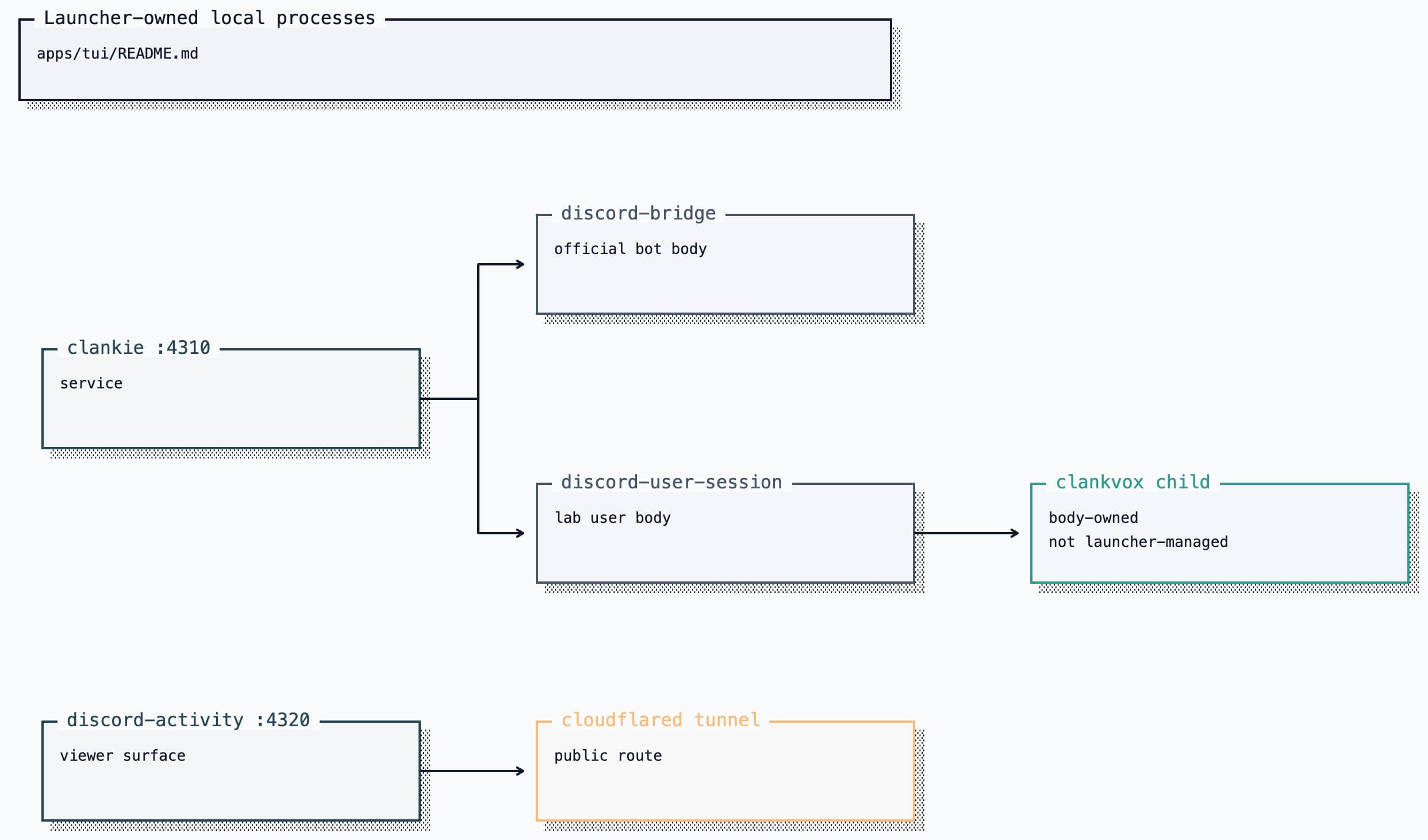
Editable Turbopuffer tldraw source
clankie autostart enable installs a user LaunchAgent that runs
clankie restart clankie at login, so the same dependency-ordered start happens
without a terminal. launchd launches it once (RunAtLoad, no KeepAlive) and
this supervision owns the processes from there; details in
docs/cli.md.
Each process has a mode-0600 pid record and adjacent log. Before signalling a
pid, the launcher re-reads its live command and refuses if it no longer matches
the service it started. Starts are health-gated; the activity tunnel is probed
through its public hostname. A restart requested inside an active operator turn
waits for that durable turn to settle, and the console reconnects without
re-running the prompt. Generic services receive ten seconds to stop after
SIGTERM. Clankie receives its configured
CLANKIE_PLAY_SHUTDOWN_DEADLINE_MS plus a two-second reporting cushion, so the
supervisor cannot force-kill an active playthrough before its terminal telemetry
settles.
Guild/channel settings come from ~/.config/clankie/settings.json. The launcher
injects repository paths and local service credentials where required, while
Discord body identities resolve directly from the credential broker. The
launcher starts only the selected Discord body; that body owns one clankvox
child through @clankie/vox-client, so Vox is not a separately supervised
credential holder.
Operator behavior
- Enter sends a prompt or steers Clankie's active Pi turn. Alt+Enter queues a
separate follow-up after the current turn and any earlier queued prompts.
The console keeps observing until all accepted inputs settle; Esc interrupts
the current turn. These choices also apply to
/skill-nameprompts. - Failed sends return the message to the editor, preserving any newer draft. A failure before sending says Message not sent. If the send loses its acknowledgement, Delivery unconfirmed asks you to check the conversation before retrying. Sends never retry automatically; an accepted turn's dropped observation reconnects without resending its message.
/conversationopens a searchable dialog for his own retained conversations — the global and workspace threads this console holds, never a fleet agent's DM thread or a channel;/conversation <name-or-path>switches directly, and--chat <conversationId>still addresses any conversation by id./chatremains an alias. Pressxto close the highlighted inactive conversation; active and default conversations stay protected. Switching rebuilds the visible transcript from the retained conversation log, then continues from the console's bounded replay cursor; it never creates a device-local session./new [title]starts and selects a conversation with fresh model context in the current workspace. The previous conversation remains available through/conversation./btw [question](alias/side) opens an ephemeral side conversation from the current Pi branch on a clean screen at the fork boundary. Its inherited history is reference-only. Ctrl+X switches between the fork and the main thread while both stay alive; Ctrl+C discards the fork and restores the main transcript. The footer names the open side conversation from either side./goalshows the selected conversation's durable goal./goal <objective>starts one;--tokens <n>gives it a hard model-token budget, andpause|resume|clearremain owner controls. Clankie proposes goals in chat; proposals do not activate themselves./autonomy on|offcontrols autonomous goal continuations and scheduled self-wakes globally./autonomy clearremoves the selected conversation's pending wake without changing its goal./cdopens the conversation for another directory and moves the console's shell escape and completion with it.- Type
/skill-namefor direct skill invocation or$at a token boundary for the skill picker. The transcript records a compactskill loadedreceipt. /activityshows the current goal, commentary, intent, observed outcome, and the loopback watch URL without controlling the body./gamesopens a toggle dialog for PokeAgent play; press Enter to enable or disable it./games on|offremains available for direct use. Restart Clankie to apply a change. Saves live with the world server, not here./memorybrowses and edits episodes and permitted Discord person facts through operator-only APIs./vt(aliases/voice-log,/voice-transcripts) opens a live overlay of retained Discord voice transcripts.Ctrl+Shift+Vtoggles the same view; Esc or/vt offcloses it. Exact speech appears only whendiscord.voiceTranscriptLoggingEnabledis on (ADR 0121); otherwise the overlay points at/discord. This is not/trace: voice lanes there are captain handoffs, not the Discord conversation./statusrendersclankie status, then adds console presence, conversation, workspace, model context, activity availability, and the Herdr pane roster./doctorrenders the same install report asclankie doctor./board,/board focus, and/board closemanage the herdr-lead companion board. A seated turn receives the current agent census./connectconfigures Linear and email and can open Discord setup; use direct/discordfor the complete lab-user opt-in flow and either body's non-secret ids (ADR 0093)./authwrites provider keys and OAuth credentials to the credential broker./auth statusmay also report compatibility provider environment fallbacks; Discord and body credentials remain broker-only except documented operator/captain test overrides./voiceselects OpenAI Realtime, Grok Voice, or OpenAI plus ElevenLabs and configures the active model, voice, xAI reasoning effort, and brokered API keys./voice statusshows the effective settings and environment overrides.- YouTube music is an ordinary prompt, not a slash command. Audible playback is on the active Discord body's Vox primary-voice role; see the Discord media guide.
/provider,/model, and/effortselect the captain through the launcher command modules. The header carries the effective Pi model and effort after subscription routing, effective-ref variant precedence, and model-supported clamping./image-modeland/video-modelselect generation models. Non-secret model configuration lives in~/.config/clankie/clankie.json./provider→ "add a local endpoint…" declares an OpenAI-compatible local runtime (ds4, Ollama, LM Studio, vLLM) by base URL, reads its model list fromGET {baseURL}/models, and needs no credential. The service picks the new provider up onclankie restart captain. Agents and scripts use the same write path throughclankie model add-local/clankie model set(JSON on stdout); do not editclankie.jsonby hand. Full contract:docs/cli.md./layoutshows or hides the header banner./jump <pane|agent>focuses a herdr agent (herdr agent focus), and any pane id in the transcript —w18:p1J, wherever Clankie or a tool wrote it — is clickable for the same jump. Only a refusal reaches the transcript; a working jump moves the session, which says it better./statuslists the pane ids to aim at.!on empty input opens the inline shell.Ctrl+Otoggles tool and bash output between preview and full; clicking a block toggles just that one. Esc interrupts an in-flight turn: the service aborts Clankie's live model turn and the run settles ascancelledin the durable log. When the run cannot be cancelled (an older service, or it already settled) — or on a second Esc — the console detaches instead and the service continues the turn.clankie healthreports operator credential source and env/store consistency without fingerprints or secret values. Remove an activeCLANKIE_OPERATOR_TOKENoverride before rotating the stored credential.
Transcript rendering
A frame renders every block in the transcript, so block cost is paid on every
keystroke and must not grow with the length of the session
(ADR 0112).
A block component returns a stable array while its content is unchanged —
memoize through ClankieRenderCache, and clear it in invalidate and in every
setter. The viewport uses that array's identity to skip re-decorating the block.
A component that rebuilds its array each call still renders correctly, but it
re-pays its own cost every frame.
Measure before and after any change to the render path:
node apps/tui/bench/transcript-render.ts          # default 10..500 blocks
node apps/tui/bench/transcript-render.ts 1000     # a specific scrollback size
The launcher runs TypeScript through Node's native type stripping; the repo's
erasableSyntaxOnly setting enforces the supported syntax.