
swarm-mcp
swarm-mcp
MCP server that lets multiple coding-agent sessions on the same machine discover each other and collaborate through a shared SQLite database.
Each session spawns its own swarm-mcp server process via stdio. They all share one SQLite file at ~/.swarm-mcp/swarm.db by default. No daemon needed.
Quick start
New here? Read docs/quickstart.md first. It walks you from zero to two Claude Code sessions seeing each other in about five minutes, with the expected output at each step.
The rest of this section is a condensed reference for non-Claude hosts. For a first-run walkthrough on a local clone, see docs/getting-started.md. For the broader modular architecture this repo is growing toward, read docs/control-plane.md. Backend and consumer config lives in docs/backend-configuration.md.
Install dependencies:
cd /path/to/swarm-mcp
bun install
Add the server to your coding agent using that host's MCP config format. Bun is the simplest dev/runtime path because the examples use bun run, but the built dist/*.js entrypoints also run under Node 20+ with better-sqlite3.
Codex (~/.codex/config.toml)
[mcp_servers.swarm]
command = "bun"
args = ["run", "/path/to/swarm-mcp/src/index.ts"]
cwd = "/path/to/swarm-mcp"
opencode (~/.config/opencode/opencode.json)
{
  "mcp": {
    "swarm": {
      "type": "local",
      "command": ["bun", "run", "/path/to/swarm-mcp/src/index.ts"],
      "enabled": true
    }
  }
}
Claude Code (~/.claude.json)
{
  "mcpServers": {
    "swarm": {
      "command": "bun",
      "args": ["run", "/path/to/swarm-mcp/src/index.ts"]
    }
  }
}
Tool names are usually namespaced by the client using the server name. Depending on the host you may see swarm_register, mcp__swarm__register, or other variants. Use whichever form your host exposes.
Call the swarm register tool first to join the swarm.
Install the packaged skill
Mounting the MCP server makes the swarm tools available, but agents still benefit from the bundled SKILL.md workflow. If your host supports installable skills (Claude Code, OpenCode, Codex with skills, etc.), install skills/swarm-mcp for coordination. Symlink is recommended over copying so updates from git pull propagate automatically:
# In your consumer project root
mkdir -p .agents/skills .claude/skills
ln -s /absolute/path/to/swarm-mcp/skills/swarm-mcp .agents/skills/swarm-mcp
ln -s ../../.agents/skills/swarm-mcp .claude/skills/swarm-mcp
Or install globally for all projects:
mkdir -p ~/.claude/skills
ln -s /absolute/path/to/swarm-mcp/skills/swarm-mcp ~/.claude/skills/swarm-mcp
Then invoke /swarm-mcp planner, /swarm-mcp implementer, etc., when starting role-specialized sessions. Full per-host install paths and copy-based alternatives live in docs/install-skill.md.
Further reading
docs/getting-started.md-- beginner-friendly setup and verification walkthroughdocs/control-plane.md-- modular agent workspace control-plane contracts and golden pathdocs/backend-configuration.md-- consumer config layers, spawner/backend selection, and future swarm-server switch shapedocs/agent-routing.md-- runtime-agnostic doctrine for swarm peers vs native subagentsdocs/identity-boundaries.md-- work/personal launcher, config, MCP auth, and routing boundariesenv/-- sourceable env-file templates for work/personal launchers and configured work trackersdocs/install-skill.md-- host-specific install paths for the packagedswarm-mcpskilldocs/swarm-server.md-- Rust daemon forswarm-ui, mobile-style pairing, PTY streaming, and LAN accessdocs/database-contracts.md--swarm.dbschema ownership and adoption contractdocs/design-batch-creation.md-- shipped-feature reference forrequest_task_batch(atomic multi-task creation with$Ndeps)docs/design-routine-dispatch.md-- design for named multi-role workflows that composerequest_task_batch+dispatch; not yet implementedskills/swarm-mcp-- installable coordination skill — mainSKILL.mdplus role references (planner, implementer, reviewer, researcher, generalist, roles-and-teams, bootstrap, coordination, cli).agents/skills-- repo-internal skills used while developing this repositoryintegrations/hermes/andintegrations/claude-code/-- runtime plugins (lifecycle, peer-lock enforcement,/swarmslash command)
MCP server vs swarm-server
The TypeScript swarm-mcp process is the stdio MCP server used by coding-agent hosts. It is enough for local multi-agent coordination through tools, resources, prompts, and the shared SQLite database. Its core job is the coordination bus: instance identity, tasks, messages, locks, KV, and best-effort wakeups.
Spawner backends are adapters around that bus. The default adapter is herdr; swarm-ui remains available as a fallback/control-surface adapter. New terminal managers should plug in as spawner/workspace backends rather than changing the task/message/lock contract.
The Rust apps/swarm-server daemon is a separate desktop/mobile control plane. It serves swarm-ui over a local Unix socket, exposes HTTPS/WSS on port 5444 for paired clients, manages PTYs, and reads the same swarm.db. It is not required for the basic MCP setup above. The current apps/swarm-ios workstream is Herdr-bridge first so Herdr remains the universal PTY owner; swarm-server remains useful reference material and the daemon for swarm-ui. See docs/swarm-server.md.
Control-plane overview
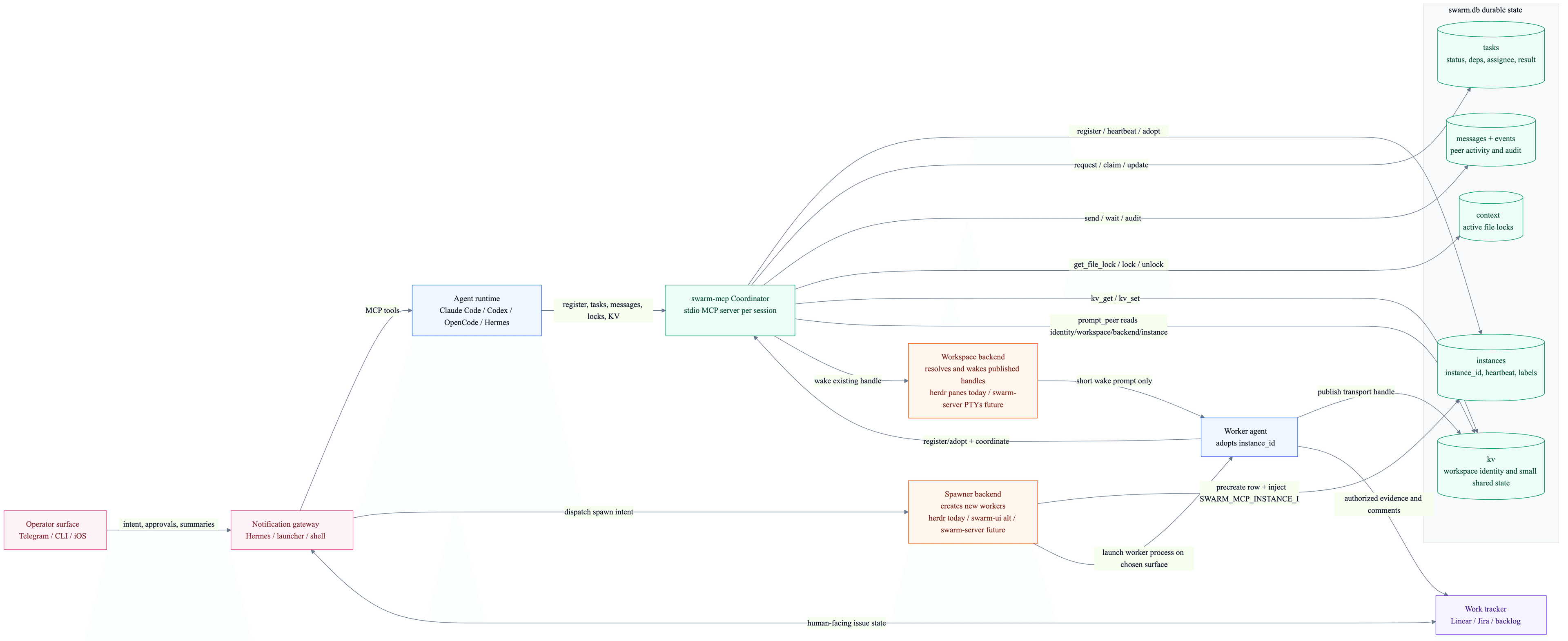
Source: docs/diagrams/backend-configuration.mmd. Backend selection and workspace identity conventions are centralized in docs/backend-configuration.md.
How it works
All sessions read and write to ~/.swarm-mcp/swarm.db by default using WAL mode, auto-vacuum, and a 3s busy timeout. Bun uses bun:sqlite; Node uses better-sqlite3.
Set SWARM_DB_PATH before launching the server if you want a different database location. Work/personal identity-separated setups should use separate paths, for example ~/.swarm-mcp-work/swarm.db and ~/.swarm-mcp-personal/swarm.db; see docs/identity-boundaries.md.
When you call register, the server starts a 10s heartbeat and a 5s notification poller.
Registration fields
The register tool accepts these parameters. Only directory is required.
| Field | Required | Description |
|---|---|---|
directory | Yes | The live working directory for the current session. |
scope | No | Shared swarm boundary. Sessions in the same scope can see each other; different scopes are different swarms. Defaults to the detected git root, or to directory when no git root exists. Use a new scope only for a separate swarm; do not split frontend/backend inside one repo with scope. Use team: label tokens for that. |
file_root | No | Canonical base path for resolving relative file paths in lock_file and task files. Useful when disposable worktrees should share one logical file tree. |
label | No | Free-form identity text. Recommended convention: machine-readable space-separated tokens like identity:work provider:codex-cli role:planner. The identity: token should match the launcher/config root when using identity separation. The role: token is optional; if missing, the session is treated as a generalist. |
Task features
Tasks support several features for building autonomous DAG-based workflows:
| Feature | Description |
|---|---|
priority | Integer (default 0). Higher = more urgent. list_tasks returns tasks sorted by priority descending. Implementers can use claim_next_task to atomically claim the highest-priority compatible task. |
depends_on | Array of task IDs. A task with unmet dependencies starts as blocked and auto-transitions to open when all deps reach done. If any dependency fails, downstream tasks are auto-cancelled. |
idempotency_key | Unique string. If a task with this key already exists, request_task returns the existing task instead of creating a duplicate. Essential for crash-safe plan retries. |
parent_task_id | Optional parent task ID for tree-structured work tracking. |
review_of_task_id | Optional task ID that a review task is reviewing. Supports $N references inside request_task_batch. |
fixes_task_id | Optional task ID that a fix task addresses. Supports $N references inside request_task_batch. |
progress_summary / progress_updated_at | First-class progress fields maintained by report_progress so peers can inspect long-running work without interrupting. |
blocked_reason / expected_next_update_at | Optional progress metadata for work that is blocked or needs a follow-up heartbeat by a specific Unix timestamp. |
approval_required | If true, task starts in approval_required status and must be approved via approve_task before work begins. Use this for true approval gates, not routine code review. |
Task statuses: open, claimed, in_progress, done, failed, cancelled, blocked, approval_required.
Session resets and prompt compaction
If a host compacts context, starts a fresh window, or loses the previous bootstrap, rejoin the swarm the same way:
- Call
registeragain. - Rehydrate with
bootstrap. - For planners, also check
kv_get("owner/planner")andkv_get("plan/latest").
The durable coordination state lives in the shared database, not in repeated per-tool prompt text.
Auto-cleanup
| Data | TTL |
|---|---|
| Stale marker (no heartbeat) | 30 seconds |
| Offline instance reclaim | 60 seconds |
| Messages | 1 hour |
| Completed/failed/cancelled tasks | 24 hours |
| Events | 24 hours |
Orphaned progress/ + plan/<instance-id> KV | 1 hour |
When a session reaches the offline reclaim window, claimed or in-progress tasks are released back to open and that session's file locks are removed.
File locks stay exclusive and are cleared when the owning instance is reclaimed offline, deregisters, or completes the owning task.
Run swarm-mcp cleanup --dry-run --json to inspect what the janitor would remove without mutating the shared database.
Tools
Instance registry
| Tool | Description |
|---|---|
register | Join the swarm. Starts heartbeat + notification poller. See Registration fields. |
deregister | Leave the swarm gracefully. Releases tasks and locks. |
bootstrap | Yield-checkpoint read for current instance, peers, unread messages, tasks, and configured work tracker metadata. |
swarm_status | Compact coordination summary: peers, unread messages, assigned/claimable tasks, locks, warnings, planner ownership, and suggested next action. |
list_instances | List all live instances. |
remove_instance | Forcefully remove another instance. Releases its tasks and locks. |
whoami | Get this instance's swarm ID. |
Messaging
| Tool | Description |
|---|---|
send_message | Send a direct message to a specific instance by ID. |
prompt_peer | Send a durable swarm message, then best-effort wake the target's workspace handle. Busy handles are not interrupted unless forced. |
peek_peer | Read recent or visible terminal text from a target's published workspace handle when the backend supports it. |
resolve_workspace_handle | Map a transport-local workspace handle, such as a herdr pane, back to a swarm instance ID. |
broadcast | Message all other instances in the swarm. |
poll_messages | Read unread messages and mark them as read. |
wait_for_activity | Block until new messages, task changes, KV changes, or instance changes arrive. Use only while actively monitoring a peer/dependency/review/lock, not as a generic idle loop. |
Task delegation
| Tool | Description |
|---|---|
request_task | Post a task (types: review, implement, fix, test, research, other). Use review for routine code review handoff. Supports priority, depends_on, idempotency_key, parent_task_id, review_of_task_id, fixes_task_id, and approval_required. |
request_task_batch | Create multiple tasks atomically in a single transaction. Supports $N references (1-indexed) for dependencies, parent links, review links, and fix links. |
dispatch | Gateway-only: create/reuse a task, wake a matching live worker, or spawn through the configured spawner backend. Ordinary workers should not call this. Pass completion_wait_seconds only when the caller wants to wait for terminal task completion; default dispatch returns immediately after handoff/spawn. |
claim_task | Start work on a specific task: assigns and transitions to in_progress in one call. Prevents double-claiming and blocks on unread messages until poll_messages (or explicit override). Also accepts tasks pre-assigned to you (status=claimed). |
claim_next_task | Atomically pick and claim the highest-priority compatible task. Prefers tasks pre-assigned to you, then open unassigned tasks. Optional filters support task types and overlapping files. |
report_progress | Update first-class progress fields on an in_progress task, including optional blocked_reason and expected_next_update_at. Use for multi-minute or blocked work. |
complete_task | Complete a claimed task with structured JSON result fields: summary, files_changed, tests, and followups. Prefer this over update_task when you can provide structured handoff details. |
update_task | Move a task to a terminal status (done, failed, cancelled). Auto-releases the actor's locks on the task's files. Use as a plain-string fallback or when structured completion is not useful. |
approve_task | Approve a task in approval_required status. Transitions to open/claimed (or blocked if deps unmet). |
get_task | Get full details of a task. |
list_tasks | Filter tasks by status, assignee, or requester. Sorted by priority (highest first). |
File locking
| Tool | Description |
|---|---|
get_file_lock | Read active lock state for a file without acquiring a lock. |
lock_file | Acquire a file lock. Re-entrant for the same instance by default; pass exclusive=true to conflict on any existing lock (including same-instance) for one-shot mutexes like spawn coordination. Locks auto-release on terminal update_task or complete_task. |
unlock_file | Release a file lock early (before the task as a whole completes). |
Key-value store
| Tool | Description |
|---|---|
kv_get | Get a value by key. |
kv_set | Set a key-value pair visible to all instances. |
kv_append | Atomically append a JSON value to a KV array. |
kv_delete | Delete a key. |
kv_list | List keys, optionally filtered by prefix. |
CLI
The same swarm-mcp binary exposes a non-MCP CLI that talks directly to ~/.swarm-mcp/swarm.db. Use it from contexts that cannot speak MCP: shell scripts, helper scripts an agent invokes (e.g. a test harness or CLI referee), cron jobs, CI, an ad-hoc terminal for inspection/debugging, or to control a running swarm-ui app.
Inside an MCP-enabled agent session, prefer the MCP tools for swarm coordination primitives (register, messages, tasks, locks, KV). The CLI is primarily for scripts, operator terminals, and the swarm-ui control surface.
Launcher-managed sessions may set SWARM_MCP_BIN to a real command such as
bun run /path/to/swarm-mcp/src/cli.ts. Agents should use that prefix instead
of assuming swarm-mcp is installed on PATH.
Setup helper:
swarm-mcp init --dir /path/to/project   # write .mcp.json and copy the packaged swarm-mcp skill
swarm-mcp init --no-skills              # write only the MCP config
init writes a project .mcp.json entry that runs npx -y swarm-mcp and, unless --no-skills is passed, copies skills/swarm-mcp into .claude/skills/. Manual host-specific MCP configs are still useful when your host does not read .mcp.json or you want to run from a local clone.
Inspection:
swarm-mcp inspect                    # unified dump of instances, tasks, kv, locks, recent messages
swarm-mcp inspect --scope /path      # pin to an explicit scope
swarm-mcp doctor                     # health report: binary, db, scope, skill/plugin install, env knobs (--json supported)
swarm-mcp messages --from <who>      # peek (does not mark read)
swarm-mcp cleanup --dry-run --json   # inspect cleanup without deleting
swarm-mcp kv list --prefix pixel:
swarm-mcp kv get pixel:turn
Writes (require identity — pass --as <uuid | prefix | unique-label-substring> or set SWARM_MCP_INSTANCE_ID; falls back to the sole live instance in scope):
swarm-mcp send --to <who> "message text"
swarm-mcp broadcast "status update"
swarm-mcp kv set  <key> <value>
swarm-mcp kv append <key> <json-value>
swarm-mcp kv del  <key>
swarm-mcp lock    <file> --note "why"
swarm-mcp unlock  <file>
Swarm UI control:
swarm-mcp ui spawn /path/to/repo --harness codex --role planner
swarm-mcp ui prompt --target role:planner "check the failing tests"
swarm-mcp ui move --target bound:<instance-id> --x 120 --y 80
swarm-mcp ui organize --kind grid
swarm-mcp ui list
These commands enqueue work for a running swarm-ui app to claim and execute. If no desktop app is running, commands remain pending until one starts.
Notes:
swarm-mcp ui spawn,ui prompt,ui move, andui organizewait up to 5 seconds by default for the desktop app to claim + complete the command. Pass--wait 0to return immediately after enqueue.swarm-mcp dispatchreturns immediately after task handoff/spawn by default. Pass--wait-for-completion <seconds>when a gateway wrapper should wait for the task to becomedone,failed, orcancelled; JSON output includes acompletionobject with the terminal task or timeout snapshot.ui spawn --harness <name>accepts any launcher alias defined for the calling profile (seeenv/launchers.zsh.example), or the canonical namesclaude/codex/opencode/hermesdirectly. Omit--harnessfor a plain shell. Pick the alias whose profile matches the worker you intend to spawn — see identity boundaries.dispatchnormalizes spawned worker harnesses through the requester's identity. The requester's profile env declaresSWARM_HARNESS_CLAUDE/_CODEX/_OPENCODE/_HERMESaliases; generic harness requests resolve to those aliases at spawn time.- Identified
dispatch/ui spawncallers must be registered with amode:gatewaylabel. Trusted operator shells can bypass that accidental-use guard withSWARM_MCP_ALLOW_SPAWN=1. - Use
swarm-mcp ui listandswarm-mcp ui get <id>to inspect queued, running, completed, or failed UI commands. --targetacceptsbound:<instance-id>,instance:<instance-id>,pty:<pty-id>, or a bare instance / PTY reference. Bare instance refs resolve by full UUID, unique UUID prefix, or unique label substring in scope. Bare PTY refs resolve by full PTY id, unique PTY id prefix, or a unique substring of the PTY command.ui movepersists layout into the sharedui/layoutKV entry for the target scope, so changes survive refreshes and can be driven from either the desktop UI or the CLI.ui organizecurrently supports only--kind grid.
State, write, and UI subcommands accept --json for machine-readable output where shown by swarm-mcp help.
Canonical helper-script pattern — a harness the agent invokes to do validation + state update + handoff in one shot:
// harness.mjs — run as `node harness.mjs <partner-id>` by an agent
import { execFileSync } from "node:child_process";
const me = process.env.SWARM_MCP_INSTANCE_ID;
const scope = process.env.SWARM_MCP_SCOPE;
// ... validate and write artifacts ...
execFileSync("swarm-mcp", ["kv", "set", "turn", JSON.stringify(next), "--scope", scope, "--as", me]);
execFileSync("swarm-mcp", ["send", "--to", partner, "your turn", "--scope", scope, "--as", me]);
Security note: --as trusts the caller. The CLI will write as any live instance. Do not expose this binary to untrusted callers — the security model is the same as the underlying shared SQLite file.
Resources
The server exposes 4 MCP resources. swarm://inbox, swarm://tasks, and swarm://instances are refreshed by the background poller when the host supports resource update notifications.
| URI | Description |
|---|---|
swarm://inbox | Unread messages for this instance. |
swarm://tasks | Tasks grouped by status, including open, claimed, in-progress, blocked, approval-required, done, failed, and cancelled. |
swarm://instances | All active instances. |
swarm://lock?file=... | Active lock state for a specific file. |
Prompts
The server exposes MCP prompts. Some hosts surface them directly, while others only expose tools and resources.
| Prompt | Purpose |
|---|---|
setup (often shown as swarm:setup) | Guides the agent through registration: call register, then bootstrap, then summarize swarm ID, active sessions, role labels, open tasks, and coordination risks. |
protocol (often shown as swarm:protocol) | Applies the recommended coordination workflow for the session: inspect lock state, use lock_file for deliberate critical sections, use messages/tasks for handoff, and inspect role: labels when choosing collaborators. |
Coordination doctrine
For autonomous collaboration, agent doctrine lives in the bundled swarm-mcp skill rather than in copy-paste AGENTS.md snippets. The skill carries a short main SKILL.md plus on-demand references for each role:
| Role | Reference |
|---|---|
Generalist (no role: token) | skills/swarm-mcp/SKILL.md |
| Planner | skills/swarm-mcp/references/planner.md |
| Implementer | skills/swarm-mcp/references/implementer.md |
| Reviewer | skills/swarm-mcp/references/reviewer.md |
| Researcher | skills/swarm-mcp/references/researcher.md |
| Roles, teams, handoff patterns | skills/swarm-mcp/references/roles-and-teams.md |
| Work tracker linkage | skills/swarm-mcp/references/work-trackers.md |
| Bootstrap fields, KV/coordination, CLI | bootstrap.md, coordination.md, cli.md |
On hosts that support installable skills, invoke /swarm-mcp planner, /swarm-mcp implementer, etc. On hosts without skill support, point your AGENTS.md (or equivalent) at skills/swarm-mcp/SKILL.md — it doubles as a readable doctrine file.
For runtime-agnostic routing doctrine that should always be loaded (not on-demand), see docs/agent-routing.md. Runtime plugins (integrations/hermes/, integrations/claude-code/) automate registration, locking, and the /swarm slash command on top of the skill.
If your host exposes MCP prompts, you can also use the built-in protocol prompt (often shown as swarm:protocol) to pull the workflow into a session on demand.
Skills
This repo ships the reusable consumer skill at skills/swarm-mcp. Repo-internal skills live under .agents/skills and are not packaged by default.
Use swarm-mcp when your host supports installable SKILL.md workflows and you want agents to learn the swarm protocol more reliably. Invoke role-specific workflows with /swarm-mcp planner, /swarm-mcp implementer, /swarm-mcp reviewer, or /swarm-mcp researcher. For install locations, see docs/install-skill.md.
Use skills in addition to minimal always-on instructions, not instead of them. A skill is a playbook; AGENTS.md is still the best place for ambient rules like "register early" and "check locks before editing."
The skills do not mount the MCP server for you. They assume the swarm MCP tools are already available in the session.
Troubleshooting
Sessions can't see each other. Check that both sessions registered with the same scope (or both defaulted to the same git root). Verify they are using the same database path (~/.swarm-mcp/swarm.db by default). Run list_instances in both sessions.
Tools aren't available after config change. Most hosts only load MCP server changes at startup. Restart the application or start a fresh session after editing the MCP config.
File locks are stuck. Stale locks are cleared automatically when the owning instance's heartbeat expires (30s). If you need to clear them manually, delete the row from the context table in the SQLite database, or restart the stuck session.
Inspecting the database directly. The database is a standard SQLite file at ~/.swarm-mcp/swarm.db. You can open it with any SQLite client (bun itself, sqlite3, DB Browser for SQLite, etc.) to inspect instances, tasks, messages, locks, and KV.
Wrong absolute path in server command. The bun run command needs an absolute path to src/index.ts. Relative paths may resolve differently depending on how the host launches the process.
Security
All sessions on the same machine share one SQLite file. Any process running as the same OS user can read and write to it. There is no authentication or authorization between sessions.
This is intentional for a local development tool. Do not use swarm-mcp across trust boundaries or expose the database to untrusted users.