
Portfolio Admin System — Design Doc
1. Overview
A self-service admin backend for managing a personal developer portfolio. Allows the portfolio owner to control which GitHub projects are displayed, manage blog posts, review chatbot debug logs, and configure system settings—all through a protected admin UI.
Stack: Next.js 14+ (App Router), OpenNext on AWS, DynamoDB, S3, NextAuth (GitHub OAuth)
2. Goals
- Single-user admin — Only the portfolio owner can access admin features
- Minimal infrastructure — Serverless, scales to zero, low cost at idle
- Fast public experience — Portfolio visitors get snappy page loads
- Debuggable chatbot — Easy access to conversation logs for debugging
3. System Architecture
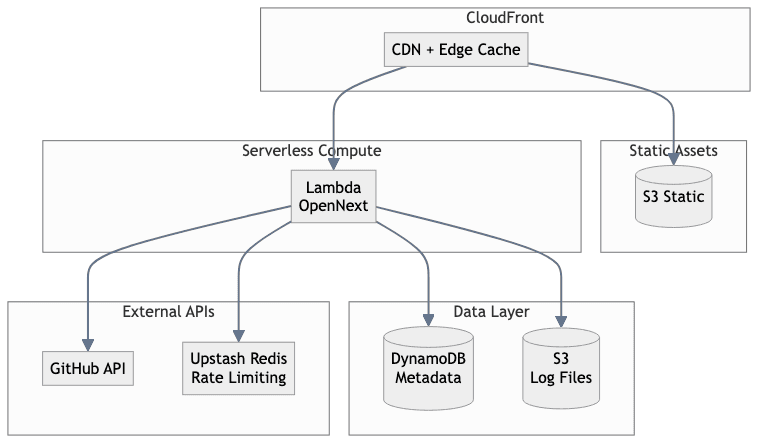
3.1 High-Level Diagram
3.2 Component Breakdown
- CloudFront: CDN for static assets and edge caching
- Lambda (OpenNext): Runs Next.js SSR, API routes, and server actions
- DynamoDB: Stores project visibility, blog posts, log metadata, settings
- S3: Stores chatbot log files and uploaded assets
- GitHub API: Fetches repo list for project management
- Upstash Redis: Rate limiting for the public chatbot endpoint
4. Authentication & Authorization
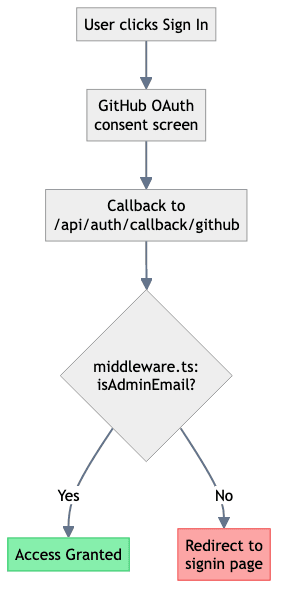
Using NextAuth with GitHub and Google OAuth providers. Only emails in the admin allowlist can access admin routes.
4.1 Auth Flow
4.2 Protection Layers
- middleware.ts: Blocks unauthenticated requests to
/admin/*viaisAdminEmail()check - lib/auth/allowlist.ts: Defines allowed admin emails
- API routes: Use
getAdminRequestContext()orrequireAdminRequest()for auth verification - Test bypass:
hasAdminBypass()allows E2E tests to skip auth
5. Data Models
5.1 DynamoDB — Admin Data Table
Admin entities share one table, differentiated by partition key (PK) and sort key (SK).
| PK | SK | Attributes |
| ---------- | ---------------- | ------------------------------------------------------- |
| PROJECTS | REPO#{name} | visible, order, description, icon, starred, updatedAt |
| LOGS | LOG#{filename} | s3Key, timestamp, tags[], sessionId, size, messageCount |
| SETTINGS | CONFIG | monthlyCostLimitUsd, chatEnabled, updatedAt |
Blog posts live in a dedicated blog table (BlogPosts, PK slug, GSI on status/publishedAt) with content stored in S3; not in the admin table.
5.2 S3 — Log File Storage
s3://portfolio-bucket/
  chat/logs/{yyyy-mm}/{filename}.json   # structured chat logs (ingested via /api/admin/logs)
  chat/exports/...                      # markdown exports for debug/export
Log files are immutable once written. Metadata in the admin table (LOGS#LOG#{filename}) enables searching/filtering without scanning S3.
6. Chatbot Architecture
The portfolio chatbot allows visitors to ask questions about the portfolio owner's work and experience. Designed for low latency and cost efficiency.
6.1 Single-Call Architecture
For a portfolio chatbot with a small, static corpus (10-30 projects, some blog posts, a bio), a two-call "plan then answer" approach adds latency without meaningful quality improvement.
1 vs. 2 Call Approach:
User: "what react work have you done"
        │
        ▼
   LLM Call #1: "I should search for: React, frontend, components, UI"
        │                                          [2-6 seconds]
        ▼
   Vector search: "React frontend components UI"
        │
        ▼
   LLM Call #2: "Based on these docs, here's the answer..."
                                                   [3-8 seconds]
Total LLM time: 5-14 seconds — The planning step duplicates what embeddings already do.
Single-Call Approach:
User: "what react work have you done"
        │
        ▼
   Vector search: "what react work have you done"
        │              ↑ embeddings handle semantic matching
        ▼
   LLM Call: "Based on these docs, here's the answer..."
                                                   [3-8 seconds]
Total LLM time: 3-8 seconds — Vector search already maps intent to relevant content.
We lose contextual hinting 2 turns ago user asked for _, if we use just the exact message for query, we lose that ability to retrieve something mentioned last turn.
When Two Calls Makes Sense:
- Large, diverse corpus (thousands of docs across different domains)
- Complex queries requiring multiple separate searches
- Agentic workflows with tool selection
- RAG over structured + unstructured data together
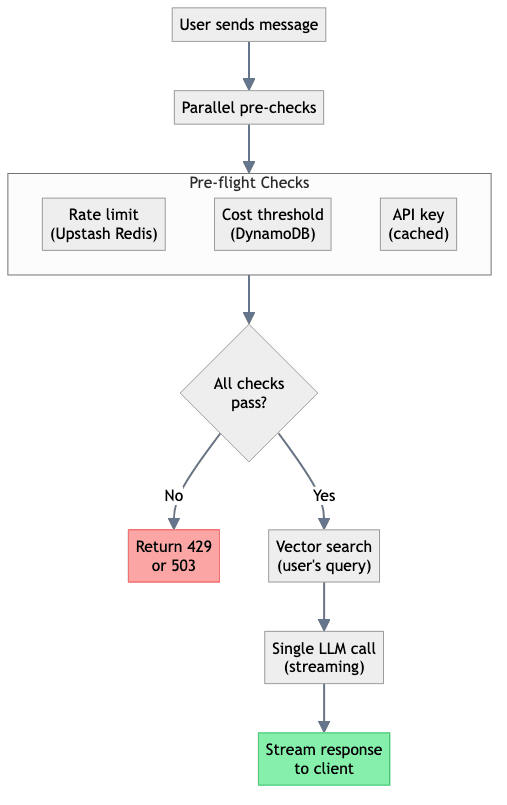
6.2 Request Flow
6.3 Latency Budget
| Step | Cold | Warm | | ---------------------------- | -------------- | -------------- | | Lambda cold start | 1-3s | 0ms | | Secrets Manager (uncached) | 100-200ms | 0ms (cached) | | Upstash Redis (rate limit) | 30-50ms | 30-50ms | | DynamoDB (cost check) | 30-50ms | 30-50ms | | Vector search | 50-200ms | 50-200ms | | LLM call (single, streaming) | TTFB: 500ms-2s | TTFB: 500ms-2s |
Target: Time-to-first-byte under 3 seconds (warm), perceived instant with streaming.
6.4 Latency Optimizations
- Cache API key at module level — Persists across Lambda invocations, eliminates Secrets Manager calls on warm starts
- Parallelize pre-checks — Run rate limit, cost check, and key fetch concurrently with
Promise.all() - Stream responses — Even if total time is 8s, streaming makes it feel instant
- Keep Lambda warm — Use EventBridge cron to ping endpoint every 5 minutes, or provisioned concurrency
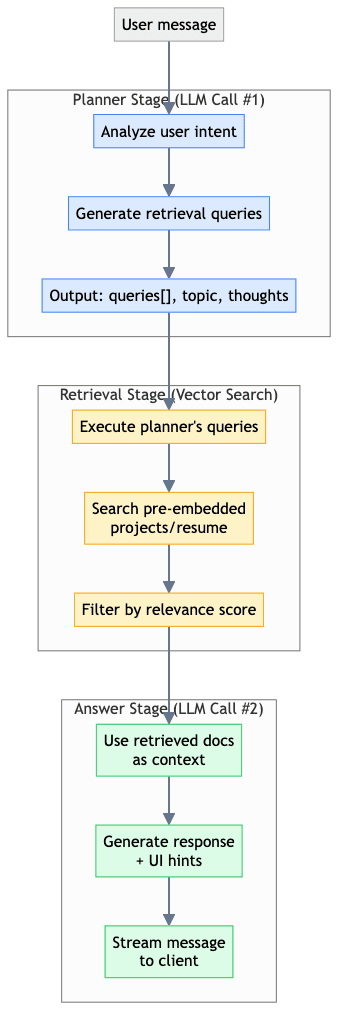
6.5 Current Implementation: Two-Call Pipeline
The chatbot uses a planner + answer architecture with pre-generated embeddings:
Key features:
- Build-time embedding — Projects and resume are embedded during
pnpm generate - Planner model — Decides what to search for (configurable via
chat.config.yml) - Answer model — Generates response using retrieved context
- Streaming — Answer streams to client for perceived instant feedback
- Reasoning traces — Both stages emit thoughts/reasoning for debugging
7. API Design
7.1 Public Endpoints
| Method | Path | Purpose |
| ------ | ------------------- | ---------------------- |
| GET | /api/projects | List visible projects |
| GET | /api/posts | List published posts |
| GET | /api/posts/[slug] | Get single post |
| POST | /api/chat | Chatbot (rate-limited) |
7.2 Admin Endpoints (Protected)
| Method | Path | Purpose |
| ------- | ---------------------------- | ------------------------------ |
| GET | /api/admin/projects | List all projects + visibility |
| POST | /api/admin/projects | Update project visibility |
| GET | /api/admin/posts | List all posts (incl. drafts) |
| POST | /api/admin/posts | Create new post |
| PUT | /api/admin/posts/[slug] | Update post |
| DELETE | /api/admin/posts/[slug] | Delete post |
| GET | /api/admin/logs | List log metadata |
| GET | /api/admin/logs/[filename] | Fetch log file from S3 |
| POST | /api/admin/logs | Ingest new log file |
| GET/PUT | /api/admin/settings | Get/update settings |
8. Project Structure
├── src/
│   ├── app/
│   │   ├── (public)/                 # Public portfolio pages
│   │   │   ├── page.tsx              # Landing/home
│   │   │   ├── projects/page.tsx     # Visible GitHub projects
│   │   │   └── blog/[slug]/page.tsx  # Blog posts
│   │   │
│   │   ├── admin/                    # Protected admin routes
│   │   │   ├── layout.tsx            # Admin layout (robots noindex)
│   │   │   ├── page.tsx              # Blog posts management (main landing)
│   │   │   ├── new/page.tsx          # Create new post
│   │   │   ├── [slug]/page.tsx       # Edit post
│   │   │   ├── portfolio/page.tsx    # Portfolio config manager
│   │   │   ├── chat-exports/page.tsx # Browse chatbot logs
│   │   │   └── components/           # Admin-specific components
│   │   │
│   │   └── api/
│   │       ├── auth/[...nextauth]/route.ts
│   │       ├── chat/route.ts         # Public chatbot (rate-limited)
│   │       └── admin/                # Protected endpoints
│   │           ├── posts/route.ts
│   │           ├── portfolio/config/route.ts
│   │           └── chat-exports/route.ts
│   │
│   ├── components/
│   │   ├── ui/                       # Shared primitives (shadcn)
│   │   ├── AdminHeader.tsx           # Header nav with animated pills
│   │   └── chat/                     # Chatbot components
│   │
│   ├── lib/
│   │   ├── auth/allowlist.ts         # Admin email allowlist
│   │   ├── rate-limit.ts             # Upstash rate limiting
│   │   └── secrets/manager.ts        # AWS Secrets Manager
│   │
│   ├── server/
│   │   ├── admin/auth.ts             # getAdminRequestContext()
│   │   ├── blog/store.ts             # DynamoDB + S3 blog storage
│   │   ├── portfolio/store.ts        # DynamoDB project visibility
│   │   └── chat/                     # Chatbot pipeline
│   │
│   └── middleware.ts                 # Protect /admin/* routes
│
└── infra/                            # SST config
8.1 Admin Navigation
Admin uses a header navigation (not sidebar) with animated pill buttons:
- Posts (
/admin) — Blog post management (default landing) - Portfolio (
/admin/portfolio) — Configure displayed repositories - Chats (
/admin/chat-exports) — Browse chatbot conversation logs - Settings dropdown — Sign out (settings page not yet implemented)
9. Key Decisions
| Decision | Choice | Rationale |
| ------------- | -------------------------- | --------------------------------------------------------------- |
| Database | DynamoDB | Serverless, no connection limits, fits Lambda |
| Blog storage | Dedicated Blog table + S3 | Simple PK per slug + status GSI; content revisions in S3 |
| Portfolio cfg | DynamoDB (PROJECTS PK) | Canonical source |
| Auth | NextAuth + email allowlist | GitHub/Google OAuth; check email instead of username |
| Admin nav | Header pills | Clean, animated, matches site aesthetic |
| Chatbot | Two-call (plan + answer) | Planner generates retrieval queries, answer uses retrieved docs |
| Rate limiting | Upstash Redis multi-tier | 5/min, 40/hr, 120/day for cost protection |
10. Future Considerations
- Search: Add OpenSearch or Algolia if blog grows and needs full-text search
- Image optimization: Use Next.js Image with S3 loader for blog images
- Analytics: Track chatbot usage patterns, popular projects
- Preview deploys: Use OpenNext preview environments for draft posts
- Log retention: Add TTL to DynamoDB, S3 lifecycle rules for auto-cleanup
Here's a structure that covers everything we discussed:
├── app/
│   ├── (public)/                     # Public portfolio pages
│   │   ├── page.tsx                  # Landing/home
│   │   ├── projects/
│   │   │   └── page.tsx              # Shows visible GitHub projects
│   │   ├── blog/
│   │   │   ├── page.tsx              # Blog listing
│   │   │   └── [slug]/page.tsx       # Individual post
│   │   └── chat/
│   │       └── page.tsx              # Your portfolio chatbot
│   │
│   ├── (admin)/                      # Admin routes (protected)
│   │   └── admin/
│   │       ├── layout.tsx            # Admin shell/nav
│   │       ├── page.tsx              # Dashboard overview
│   │       ├── projects/
│   │       │   └── page.tsx          # Toggle repo visibility
│   │       ├── blog/
│   │       │   ├── page.tsx          # List/manage posts
│   │       │   ├── new/page.tsx      # Create post
│   │       │   └── [slug]/page.tsx   # Edit post
│   │       ├── logs/
│   │       │   ├── page.tsx          # Browse log files
│   │       │   └── [filename]/page.tsx  # View single log
│   │       └── settings/
│   │           └── page.tsx          # Chatbot cost threshold, etc.
│   │
│   ├── api/
│   │   ├── auth/[...nextauth]/route.ts
│   │   ├── chat/route.ts             # Chatbot endpoint (public, rate-limited)
│   │   └── admin/
│   │       ├── projects/route.ts     # GET/POST project visibility
│   │       ├── posts/
│   │       │   ├── route.ts          # GET all, POST new
│   │       │   └── [slug]/route.ts   # GET/PUT/DELETE single
│   │       ├── logs/
│   │       │   ├── route.ts          # GET list, POST new log
│   │       │   └── [filename]/route.ts  # GET file, PATCH tags
│   │       └── settings/route.ts
│   │
│   └── layout.tsx                    # Root layout
│
├── lib/
│   ├── auth.ts                       # NextAuth config (GitHub provider)
│   ├── db/
│   │   ├── client.ts                 # DynamoDB client (cached)
│   │   ├── projects.ts               # Project visibility CRUD
│   │   ├── posts.ts                  # Blog post CRUD
│   │   └── settings.ts               # App settings/config
│   ├── s3/
│   │   ├── client.ts                 # S3 client (cached)
│   │   ├── logs.ts                   # Log file operations
│   │   └── uploads.ts                # Image/asset uploads
│   ├── github.ts                     # Fetch repos from GitHub API
│   ├── openai.ts                     # Cached API key + client
│   └── rate-limit.ts                 # Upstash rate limiting
│
├── components/
│   ├── ui/                           # Shared UI primitives
│   │   ├── button.tsx
│   │   ├── card.tsx
│   │   └── ...
│   ├── chat/
│   │   ├── chat-interface.tsx
│   │   └── message.tsx
│   ├── admin/
│   │   ├── project-toggle.tsx        # Checkbox row for a repo
│   │   ├── post-editor.tsx           # Blog editor
│   │   ├── log-viewer.tsx            # Display log file contents
│   │   └── nav.tsx                   # Admin navbar
│   └── portfolio/
│       ├── project-card.tsx
│       └── blog-preview.tsx
│
├── middleware.ts                     # Protect /admin/* routes
│
├── infra/                            # IaC (SST or CDK)
│   ├── sst.config.ts                 # or cdk stack
│   └── ...
│
├── types/
│   ├── project.ts                    # { repoName, visible, order, ... }
│   ├── post.ts                       # { slug, title, content, published, ... }
│   └── log.ts                        # { filename, timestamp, tags, ... }
│
└── .env.local
    # AUTH_GITHUB_ID=
    # AUTH_GITHUB_SECRET=
    # AUTH_SECRET=
    # ADMIN_EMAILS=you@example.com  (comma-separated allowlist)
    # AWS_REGION=
    # BLOG_TABLE_NAME=
    # CONTENT_BUCKET=
    # UPSTASH_REDIS_REST_URL=
    # UPSTASH_REDIS_REST_TOKEN=
    # OPENAI_API_KEY=  (or use Secrets Manager)
Key Files Explained
lib/db/client.ts — Cached DynamoDB client:
import { DynamoDBClient } from '@aws-sdk/client-dynamodb';
import { DynamoDBDocumentClient } from '@aws-sdk/lib-dynamodb';

let client: DynamoDBDocumentClient | null = null;

export function getDbClient() {
  if (!client) {
    client = DynamoDBDocumentClient.from(new DynamoDBClient({ region: process.env.AWS_REGION }));
  }
  return client;
}
lib/db/projects.ts — Project visibility logic:
import { getDbClient } from './client';
import { QueryCommand, UpdateCommand } from '@aws-sdk/lib-dynamodb';

const TABLE = process.env.DYNAMODB_TABLE!;

export async function getVisibleProjects() {
  const db = getDbClient();
  const result = await db.send(
    new QueryCommand({
      TableName: TABLE,
      KeyConditionExpression: 'PK = :pk',
      ExpressionAttributeValues: { ':pk': 'PROJECTS' },
    })
  );
  return result.Items?.filter((p) => p.visible) ?? [];
}

export async function setProjectVisibility(repoName: string, visible: boolean, order?: number) {
  const db = getDbClient();
  await db.send(
    new UpdateCommand({
      TableName: TABLE,
      Key: { PK: 'PROJECTS', SK: `REPO#${repoName}` },
      UpdateExpression: 'SET visible = :v, #order = :o',
      ExpressionAttributeNames: { '#order': 'order' },
      ExpressionAttributeValues: { ':v': visible, ':o': order ?? 0 },
    })
  );
}
middleware.ts:
import { NextResponse } from 'next/server';
import { auth } from '@/auth';
import { isAdminEmail } from '@/lib/auth/allowlist';
import { hasAdminBypass } from '@/lib/test-flags';

export default auth((req) => {
  const pathname = req.nextUrl.pathname;
  const isAdminPage = pathname.startsWith('/admin');
  const isAdminApi = pathname.startsWith('/api/admin');
  const isDebugPage = pathname.startsWith('/debug');
  const isDebugApi = pathname.startsWith('/api/debug');

  if (!isAdminPage && !isAdminApi && !isDebugPage && !isDebugApi) {
    return NextResponse.next();
  }

  if (hasAdminBypass(req.headers)) {
    return NextResponse.next();
  }

  const email = req.auth?.user?.email;
  if (!email || !isAdminEmail(email)) {
    const url = new URL('/api/auth/signin', req.url);
    url.searchParams.set('callbackUrl', req.nextUrl.href);
    return NextResponse.redirect(url);
  }

  return NextResponse.next();
});

export const config = {
  matcher: ['/admin/:path*', '/api/admin/:path*', '/debug/:path*', '/api/debug/:path*'],
};
DynamoDB Table Design
Single table with this structure:
| PK | SK | Attributes |
| ---------- | ---------------- | ---------------------------------------------- |
| PROJECTS | REPO#repo-name | visible, order, description, updatedAt |
| POSTS | POST#slug | title, content, published, createdAt |
| LOGS | LOG#filename | s3Key, timestamp, tags[], size |
| SETTINGS | CONFIG | costThreshold, chatEnabled, etc. |
Implementation Status
✅ Fully Implemented
| Feature | Notes |
| -------------------------------- | -------------------------------------------------------------------------------------- |
| Auth with email allowlist | NextAuth with GitHub + Google providers; middleware.ts + isAdminEmail() enforced |
| Admin middleware coverage | Middleware guards /admin/*, /api/admin/* (and debug routes once moved under admin) |
| Portfolio in DynamoDB | src/server/portfolio/store.ts uses PROJECTS#REPO#{name} rows as source of truth |
| Settings page + settings row | /admin/settings backed by SETTINGS#CONFIG in DynamoDB |
| Chat log metadata + tagging | S3 log bodies with DynamoDB metadata + tags; UI/editor in /admin/chat-exports |
| Blog post management | Full CRUD with draft/scheduled/published/archived lifecycle |
| DynamoDB + S3 for blog | Metadata in DynamoDB, content revisions in S3 |
| Upstash rate limiting | Multi-tier (5/min, 40/hr, 120/day) |
| Two-call chatbot pipeline | Planner → retrieval → answer with streaming + reasoning traces |
| Header navigation | Animated pill buttons for admin nav |
⚠️ Partially Aligned
None.
❌ Not Yet Implemented
None (future enhancements live in the roadmap/considerations).
Alignment Notes
- Portfolio config now reads only from DynamoDB; legacy gist/S3 runtime fallback has been removed.
- Admin and debug endpoints are expected to sit behind the middleware allowlist guard.
- Settings and runtime cost toggles live in
SETTINGS#CONFIGand/admin/settings. - Chat log storage writes JSON to S3 and metadata (including tags) to DynamoDB for filtering.